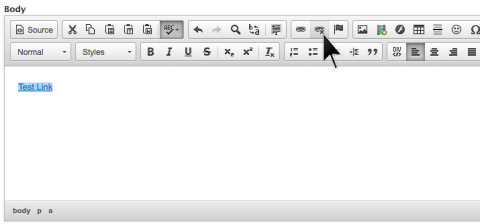
How to Add and Delete Links on Page
Using rich text editor to make changes to page
How to add a link:
- Highlight words on page
- Select link tool (i.e., first row in middle – looks like chain link)
If you have full web address, copy and paste it into box next to http:// menu. Note: if type it in, leave off the http:// portion of address.
Image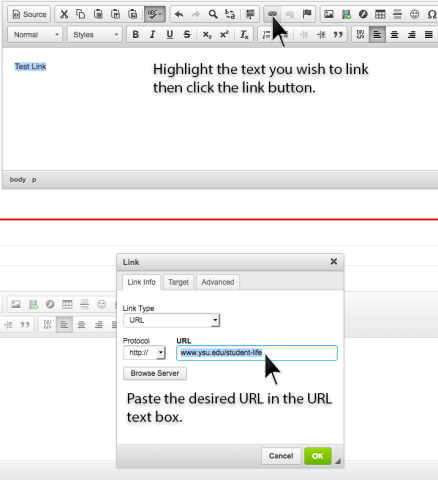
In order to provide a title for document (i.e., pdf, doc, etc.) link (i.e., to meet accessibility standards), select the Advanced tab and enter text into Advisory Title box. See How to Upload Files for creating a link to an uploaded document. Note: place an asterisk* after a document link.
Image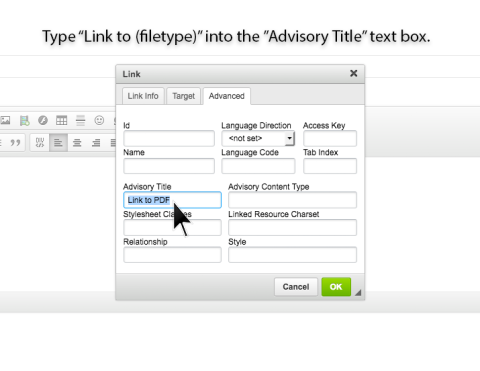
Optional: Email Link - select E-mail from Link Type menu, then enter E-mail Address into respective box, then enter subject for e-mail recipient (e.g., Human Resources Benefit Information Inquiry, etc.). Message Body is optional (i.e., note to person who clicks on e-mail link – e.g., please include your contact telephone number, etc.).
Image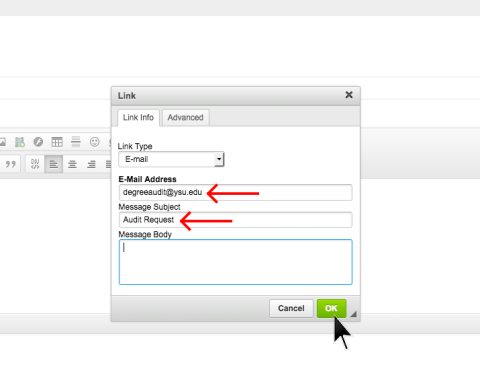
- Click OK (button) when finished.
How to break an existing link:
Highlight hyper-text link, then select broken link (icon) – to the right of link icon on toolbar.
Image