
Digital Materials - Opt-Out Instructions
Digital course materials are electronic versions of course materials that can be read on a computer or handheld device. These materials are offered in partnership with the YSU Barnes and Noble. Digital course materials can include coursework (such as MyLab, Mindtap, etc.).
Students may choose to opt out of Digital Materials, but are strongly encouraged to speak with their instructors prior to opting out, as the materials may contain integrated components of the course.
The deadline to opt out corresponds with the 100% refund period for the course associated with the materials. Please review our Academic Calendar for 100% refund dates.
Instructions
- Log in to Blackboard and select "Courses" from the main navigation menu
Select the course with the digital materials from your course list
Image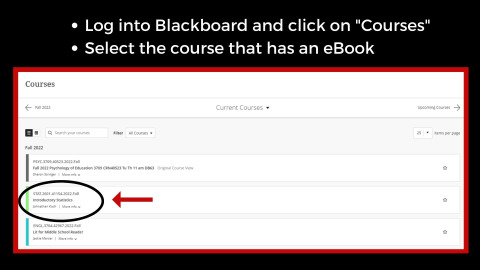
- Select "Course Faculty"
Under "Books & Tools" heading, select "View course & institution tools"
Image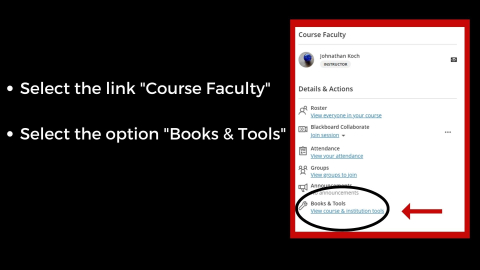
Then select "Course Materials"
Image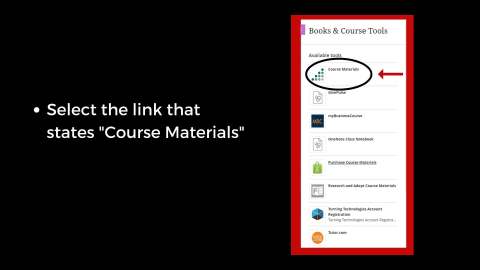
To opt out, select on the button labeled "Want to opt-out?"
Image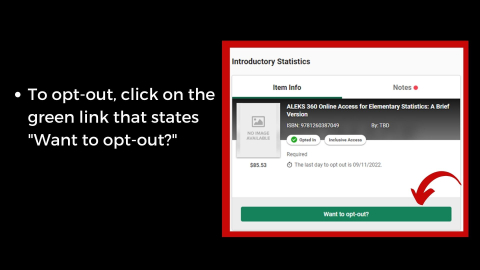
- If completed correctly, the status message on the Course Materials page should change from "Opted In" to "Opted Out" under the title of the material
- Follow the same steps listed above to opt back in if needed. You can opt back in until the last day to receive a 100% refund.
Having trouble?
Contact your instructor with questions regarding accessing digital materials and opting out.
Not all courses have digital materials.