-
-
Colleges
-
-
Student Experience
- Fraternity/Sorority Life
- Kilcawley Center
- Student Government
- Student Media
- Student Organizations & Activities
- Penguin Productions
- Club Sports
-
Campus Services
- YSU Bookstore
- Penguin Service Center
- Guest Services & the YSU ID Office
- IT Help Desk / Service Desk
- Wee Care Day Care
- YSU App
- PNC Banking
Student Support & Advocacy- Community Standards & Student Conduct
- Dean of Students
- Veteran Affairs
- Title IX Office
- Penguin Pantry & Career Closet
- Report a Penguin of Concern
- McDonough Musuem
- Minerals Museum
- Judith Rae Solomon Gallery
- Youngstown Steel Museum
- The Butler Institute of American Art
- WYSU

 Portal
Light Therapy
Light therapy equipment is available for you to reserve free of charge. You may check out the devices from Maag Library at the Library Services Desk, Main Floor.
For more information including use, benefits, functions, troubleshooting, and more, click the dropdown below.
- Biofeedback
Biofeedback Instructions (iom2)
What is Biofeedback?
Biofeedback is a form of treatment in which individuals are trained to use signals from their body as a way to improve their health. Through biofeedback, individuals become aware of how their minds and bodies work together in response to stress and anxiety. This feedback is used to help individuals improve their overall self-regulation. The biofeedback device tracks Heart Rate Variability (HRV), which is a measure of the variation in time between heartbeats and is considered to be a strong indicator of your meditative state. Decades of research shows that a higher HRV correlates with an optimal, relaxed nervous system state, positive emotions, and improved health.
How can it help you?
According to the research, HRV biofeedback may, as part of a healthy lifestyle, help in the following ways:
- Improve ability to handle adversity or stressful situations
- Decrease anxiety (including test, public speaking, performance anxiety, etc.)
- Reduce depression
- Improve responses to anger-inducing stimuli
- Improve sleep quality
- Reduce pain
- Improve gastrointestinal disorder symptoms
- Improve mood and psychological well-being
- Help fine-tune skills for optimal sports performance
- Reinforce a sense of balance (i.e. it helps the body to correct itself).
- Motivates individuals to take a more active role in their personal healthcare.
Note: Biofeedback as a method for self-regulation can be a very effective tool for dealing with stress, but it is seldom adequate by itself for treating various forms of anxiety. Typically, working with a counselor to modify patterns of thought and behavior is needed and sometimes medication as well.Precautions
Students may want to check with their doctor or mental health professional before using the iom2 device if they have any of the following:
- Disorders involving a severe, unstable autonomic nervous system or endocrine or metabolic functions (e.g., diabetes)
- Severe memory, attention or neurological conditions (e.g., seizures)
- Severe or unstable medical illness, including a heart condition, hypertension, or asthma
- Significant psychological disorder (e.g., schizophrenia, mania, major depression, paranoia, severe obsessive-compulsive disorder or post-traumatic stress disorder)
- Headaches
Side Effects
The most common side effects of biofeedback training are:
- Drowsiness
- Mild light headedness
- Tingling of the hands and feet.
What is our biofeedback program?
You will use Unyte for your biofeedback program. Unyte is unlike any other relaxation or stress-management program. With a biofeedback device known as the iom2, your breathing and heart rate will guide your practice.
With a simple ear clip, the iom2 measures your body's Heart Rate Variability (HRV) to determine your resonance score. The iom2 is paired with Journeys software to help you gain a greater awareness of your thoughts, feelings, emotions, and physical state. The Journeys software helps to guide you through your meditations into a deeper state of relaxation.
What are journeys?
What makes Unyte so effective is their unique combination of the iom2 and their interactive programs - called Journeys.
Together, the Journeys guide you through a step-by-step relaxation training in interactive environments, providing real-time feedback (resonance score) so you can evaluate where you are and where you need to go.
The Journeys can be accessed on computers as well as mobile devices and tablets.
What is a resonance score and why is it important?
Unyte using the iom2 device helps you learn how to effectively control your HRV using a “Resonance Score”. Resonance is a well-known phenomenon in physics. It is when a vibrating system causes another nearby system to begin vibrating with even greater amplitude, enhancing the effect. Unyte uses this concept of resonance as follows: By measuring the user’s heart rate, Unyte can calculate HRV. These times between heartbeats generally follow a sinusoidal cycle, which is a smooth, periodic curve resembling a wave. Your respiration pattern also follows a similar cycle, increasing with each inhale and decreasing with each exhale. The closer these cycles match, the higher your resonance score. Using the breathing indicator, you can learn to align your respiration cycle with that of your heart beat cycle. This state of matching cycles is associated with a relaxed nervous system and many health benefits.
Unyte's Journeys include a customizable breathing indicator that guides you to a more optimum breathing rate. Your breathing rate influences your HRV and Resonance score, which is clearly displayed in real-time.
Unyte’s Resonance score ranges from 1 to 100% and is a direct reflection of the magnitude of your HRV. The higher your HRV, and the more relaxed you are, the higher your resulting resonance score. As your score improves, the game progresses via clear visual and audio prompts that show your body is responding. **Try using diaphragmatic breathing to begin improving your resonance score.
Image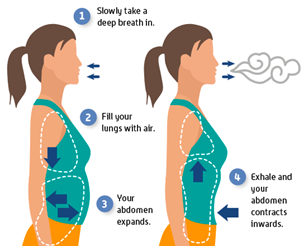
**Diaphragmatic breathing, or “belly breathing,” involves fully engaging the stomach, abdominal muscles, and diaphragm when breathing. This means actively pulling the diaphragm down with each inward breath. In this way, diaphragmatic breathing helps the lungs fill more efficiently.
To set up your Unyte Account:- Students will receive an email link (in your YSU email) from Unyte to create an account (after talking with the Unyte Coordinator). Follow the link in the email to set up your account.
- Once your account is set up you will need to download the journeys onto your electronic device (phone, tablet, IPad, or computer). The journeys have been listed below. When searching for the journeys, if you are using google play or the app store on an apple device, search the name of the journey and the word unyte, look for the symbol next to the names listed below. It is suggested that your start with the Body Scan Mediation journey.
To pair your iom 2:
- Once your journey is downloaded you will press the button on the side of the iom2 device to begin. If you are using a computer you will use the cord to connect it to your computer. If you are using any other device you will press the button a second time to connect it to your device via Bluetooth. It will say when it is connected.
- Once you have connected your electronic device to the iom2 device you will start a journey and place the sensor clip onto your ear lobe. When you successfully place the sensor the iom2 device will say that it is reading data. If the sensor is not placed correctly the iom2 device will ask you to adjust the sensor.
Image
Downloading a Journey onto a computer:How do I download a Journey?
All available Journeys are ready for download through the Unyte dashboard under the "Downloads" tab found at the top of the page.To begin downloading the installation file for a Journey, click the "Download" link found on the tile of each Journey.
The most appropriate download for your system will automatically be selected and downloaded. If you would prefer to access a download file for a different system, select it at the bottom of the page under "Downloading journeys for:".
Depending on your browser the downloaded file will be presented in different ways.
- CHROME - Downloads will appear across the bottom of the browser
- FIREFOX - Downloads can be found by clicking the Downloads button (down arrow) in the toolbar.
- SAFARI - Downloads will appear in your downloads folder
- MICROSOFT EDGE - A notification will appear across the bottom of the browser
Installing a Journey
Once downloaded, it's time to install the Journey!After locating the downloaded installation file, select and run the file.
This will launch the installation wizard that will guide you through the process. Follow the on-screen instructions.
Launching a Journey
Once installed, you are now able to launch your Journey!The newly installed Journey will be available along with your other installed applications.
Unyte Journeys
Body Scan Meditation by Unyte (Try first)Image
Select your preferred avatar, scenery, music, and length of time and be guided through an immersive body scan meditation by the Zen Master.
Mindfulness MeditationImage
This nine-step guided meditation program features the work of Tara Brach, Ph.D., and focused on mindfulness. As you progress through each step you’ll find yourself achieving greater self-awareness and developing a deeper sense of calm.Zen JourneyImage
Immerse yourself in the teachings of Zen Master Nissim Amon as you learn the history of the Buddha and take part in interactive guided mediations with real-time feedback. As you progress through the five levels, you will not only gain valuable insight, but you will also reach the ultimate goal of obtaining your black robe. You will not be able to advance until the Zen Master is satisfied you are making suitable progress towards the next robe so you will not be able to just listen and be passive.
EscapesImage
Enjoy 12 peaceful and engaging biofeedback events to promote your mind-body connection and increase your relaxation. Escapes combines two titles into one amazing program. The classics include breathing tree, yoga passage, gentle rain, golden horn, humble rabbit, and peaceful fire. Heartscapes includes resonance flow, divine moons, gentle snow, helping hand, night wolf, and call of the wild.
Five ElementsImage
Engage in five events that take you through an immersive journey based on the classical elements of the universe. Using breathing and relaxation techniques with integrated biofeedback, we’ll guide you on a meditative, mindfulness journey through the five elements, giving you the opportunity to balance them in this world and in turn, within yourself.Relaxing RhythmsImage
Gives you the art and science of balanced living. This app contains 3 different areas. The first is guided training, which contains the 15 steps. Each of these steps includes an inspirational piece, two guided meditations and a practice event. The second area is self-exploration, where you can listen to more guided meditations. Last the graph is also included, where you can watch your physiological states being tracked in real time.
Villa SerenaImage
Restore Villa Serena. Restore your peace of mind. Much like our own minds, villa serena was once a stunningly beautiful and peaceful retreat with a sparkling pool of rainwater where visitors could relax, refresh, and recover from the worries and stresses of everyday life. However, just like our own minds, over the years, what made it peaceful and serene has been neglected and forgotten, and has fallen into a state of disrepair.When you first visit villa serena you’ll notice there is no one present in this enclosed space, away from the distractions of the outside world. You are alone, challenging you to be present with yourself. No mentor. No guidance. Just you and your mind, breath, and your thoughts. Your mind will race, thoughts will come, but you’ll find calm in the gaps between the thoughts.
Repair and restore everything from floors to walls. The power of your breath and calm is your toolset. Once the repairs are done, relax to summon the rain. After filling the pool, a glorious start night appears.
Relaxing Rhythms 2Image
In this ten-step program you will be taken through three parts-an introduction, guided meditation, and practice event. Going through the program, and following the breathing indication, you will learn to control your breath to promote a sense of calm and wellbeing.**Tip: By clicking anywhere on the guide bar you can hide all values. Clicking the guide bar again will re-enable them. This may be helpful if you find yourself too focused on the resonance score causing distraction from your breathing and relaxation.
Questions or issues with Unyte: Go to Unyte Help Center
To contact Unyte : email: support@unyte.com
phone: 1-866-594-9453 (option 2)
FAQ
- Where do I start? There are so many options!
- Unyte recommends you start with the Body Scan Meditation or Relaxing Rhythms 2.
i. BODY SCAN MEDITATION - A wonderful place to start. A great introductory Journey; Body Scan helps you develop a mindful awareness of your bodily sensations. Select your preferred avatar, scenery, music and length of time and be guided through an immersive body scan meditation by Zen Master Nissim Amon.
ii. RELAXING RHYTHMS 2 - A 10-step program containing a combination of guided meditations and interactive biofeedback events. Each step contains three sections that can be explored in sequence or on demand. First, an introduction to the theme of the step, followed by a guided meditation from a renowned master. At the completion of each step, you will use your breath to control your emotions and conquer different challenges in nine different interactive events.
- Unyte recommends you start with the Body Scan Meditation or Relaxing Rhythms 2.
- My schedule is busy…how do you recommend I integrate this into my schedule?
- Some of the journeys you can choose the time and most of the journeys have sections that are less than 10 minutes to complete.
- I’m getting too distracted by only looking at my resonance score. Any tips?
- By clicking anywhere on the guide bar you can hide all values. Clicking the guide bar again will re-enable them. This may be helpful if you find yourself too focused on the resonance score causing distraction from your breathing and relaxation.
- What can I do to help with my anxiety if I am placed on the wait list for the iom2?
- Feel free to call the YSU Student Counseling Services to set up an appointment with one of our staff counselors! (330) 941-3737
- What can I do to continue my mindfulness journey after checking out the iom2?
- Try one of the mindfulness apps we have listed on our website.
i. Headspace
ii. Stop, Breathe, & Think
iii. Calm
- Try one of the mindfulness apps we have listed on our website.
- Light Therapy
Lightbox
What is lightbox therapy?
Light therapy is a way to treat seasonal affective disorder (SAD) (a type of depression that an estimated 6.8% of the U.S. population struggle with) and certain other conditions by exposure to artificial light.
During light therapy, you sit or work near a device called a light therapy box. The box gives off bright light that mimics natural outdoor light.Light therapy is thought to affect brain chemicals linked to mood and sleep, easing SAD symptoms. Using a light therapy box may also help with other types of depression, sleep disorders, and other conditions. Light therapy is also known as bright light therapy or phototherapy.
How can it be helpful to you?
You may want to try light therapy for some of the following reasons:
- Your doctor recommends it for seasonal affective disorder or another condition
- You want to try treatment that is safe and has few side effects
- You want to increase the effectiveness of antidepressant medication or mental health counseling
- You need to avoid antidepressant medications during pregnancy or while breast feeding
Conditions it is used for include:
- Seasonal affective disorder (SAD)
- Types of depression that don’t occur seasonally
- Jet lag
- Sleep disorders
- Adjusting to a nighttime work schedule
- Dementia
PrecautionsStudents may want to check with their doctor or mental health professional before using the light therapy box if they have any of the following:
- You have a condition that make your skin especially sensitive to light, such as systemic lupus erythematosus
- You take medications that increase your sensitivity to sunlight, such as, certain antibiotics, anti-inflammatories, or the herbal supplement St. John’s Wort
- You have an eye condition that makes your eyes vulnerable to light damage or conditions including retina disease or diabetes.
**Cautions for Bipolar DisorderLight therapy may trigger mania in some people with bipolar disorder, so get advice from your doctor before starting light therapy. If you have any concerns about how light therapy may be affecting your mood or thoughts, seek help right away.
Side Effects
Light therapy is generally safe. If side effects occur, they’re usually mild and short lasting. They may include:
- Eyestrain
- Headache
- Nausea
- Irritability or agitation
- Mania, euphoria, hyperactivity, or agitation associated with Bipolar Disorder
FAQ
What is seasonal affective disorder (SAD)?
- Significant changes in your mood and behavior whenever the seasons change. In most cases, symptoms start in the late fall or early winter and go away during the spring and summer.
Are tanning beds an alternative to the light box?
- No there is no proof that this works. The UV light released by tanning beds can damage your skin and greatly increase your risk of skin cancer
Does the light box transmit UV light?
- No, our light box is UV free LED- the built-in LED light panel delivers the full brightness with no pollution, no radiation, and no stroboscopic effects.
How can I be most effective with the light box?
- Sit or work near a light box
- Light from the light box must enter your eyes indirectly
- It requires time and consistency, stick to your therapy schedule and don’t overdo it
How long should my sessions be?
- 20-30 minutes a day
What time of the day is the light box most effective?
- For most people, light therapy is most effective when it’s done early in the morning, after you first wake up.
Info found at Mayo Clinic Light Therapy webpage