

 Portal
Alert Box
Notification Box
Withdrawal from All Courses (Complete Withdrawal)
Any current undergraduate or graduate student who wishes to withdraw from all courses for a particular term must access the registration system on the Penguin Portal. Review the instructions below to drop/withdraw from all courses. It is the student's responsibility to confirm that the withdrawal was correctly processed, and the courses are deleted. Nonattendance of class, or notification to the instructor or department does not constitute official withdrawal. For more information regarding withdrawling from classes, visit Withdrawal Process or contact the Penguin Service Center at 330-941-6000 or onestop@ysu.edu.
1. Log in to the Penguin Portal via www.ysu.edu.
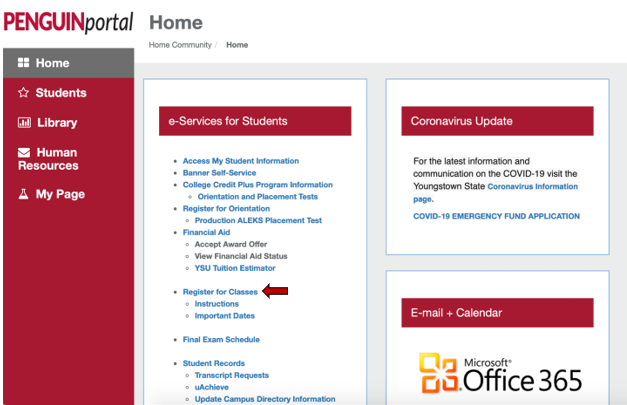
2. Under e-Services for Students, click Register for Classes
Image
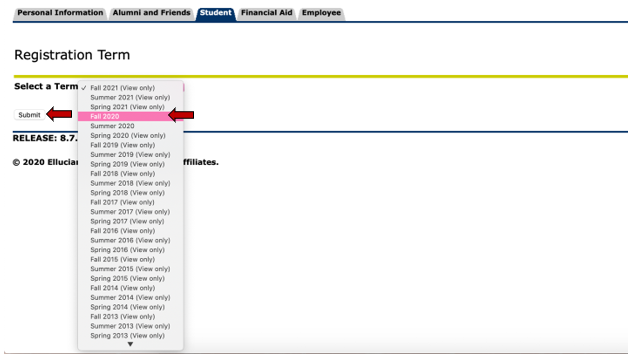
3. Select the appropriate term from the drop-down menu then click Submit.
Image
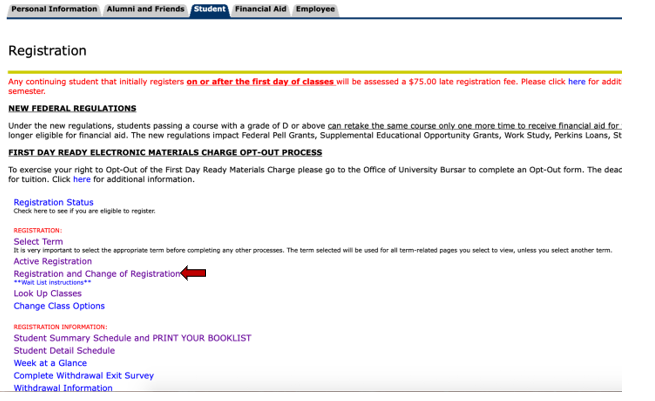
4. Under Registration, select Registration and Change of Registration.
Image
5. Review your schedule in "Registration and Change of Registration to verify your current enrollment and the total credit hours for which you are registered. To completely withdraw, select Web Drop... from drop down menu under Action column for every course.
6. Click Submit Changes at the bottom of the page.
7. During weeks 3 - 9 of the semester, you will notice this error message:
- Student who utilizes financial aid: Submit the Complete Withdrawal Exit Survey; Meet with a Financial Aid Counselor as soon as possible; Web-drop classes again after completing the survey and meeting with the counselor
- Student who does not utilize financial aid: Submit the Complete Withdrawal Exit Survey; Web-drop classes again after completing the survey
- Student athlete: See athletic academic advisor
8. From the error message, click on HERE for the link to the survey. It will bring you to the Answer a Survey page; click on Complete Withdrawal Exit Survey.
9. Answer each question, clicking on Next Question to submit your responses. Once you answer the last question, you will be able to click Survey Complete. You will receive an email that verifies your completion of the survey and reminds you to go back in to the Add or Drop Classes section of the registration system to completely withdraw as soon as possible.
10. Now that your survey is submitted, go back through steps one through six (above) to withdraw from your courses, submitting your complete withdrawal.